2026 RollCall Release Notes - 23 April

Modified on Fri, 24 Apr at 3:21 PM

https://campaign-image.com/zohocampaigns/606000012048022_zc_v61_1658499249652_logo_v2_(1).png

Release Notes

Please find below our Release Notes for new features and enhancements to the RollCall system.

New Features & Enhancements

Integrations are going Self Service

https://stratus.campaign-image.com.au/images/36229000001658004_1_1776923784545_zc-noimage.png

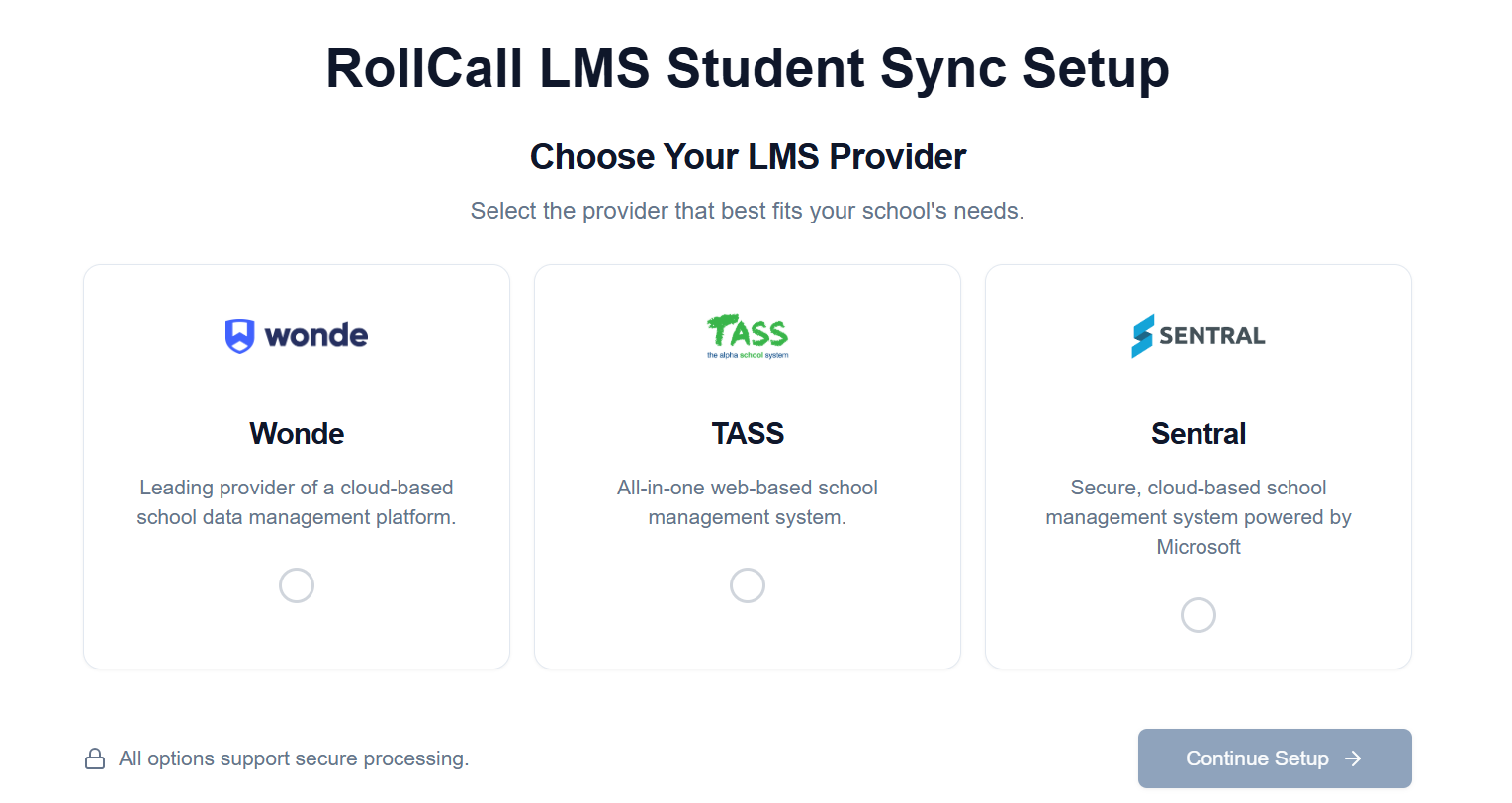
Coming soon... a dashboard that allows schools to set up and manage their own Student Management System (SMS) Integration.

School admins can:

  • Set up the integration using our guided wizard
  • Preview how student data will sync before anything goes live
  • Find and fix sync issues for individual students or parents

It shows what the data will look like before syncing, and gives helpful details to spot problems, understand what’s wrong, and fix issues - all without affecting live data.


Rollcall now supports Compass

RollCall welcomes Compass as the newest edition to our integration partners.  Simplify your rollcall data management by connecting your student management system today.

https://stratus.campaign-image.com.au/images/36229000001658004_zc_v1_1776915639489_compass_education_logo.png
     

New Message Delivery Status Dashboard

https://stratus.campaign-image.com.au/images/36229000001658004_zc_v1_1776906239803_messaging_hub___release_notes_(1).png

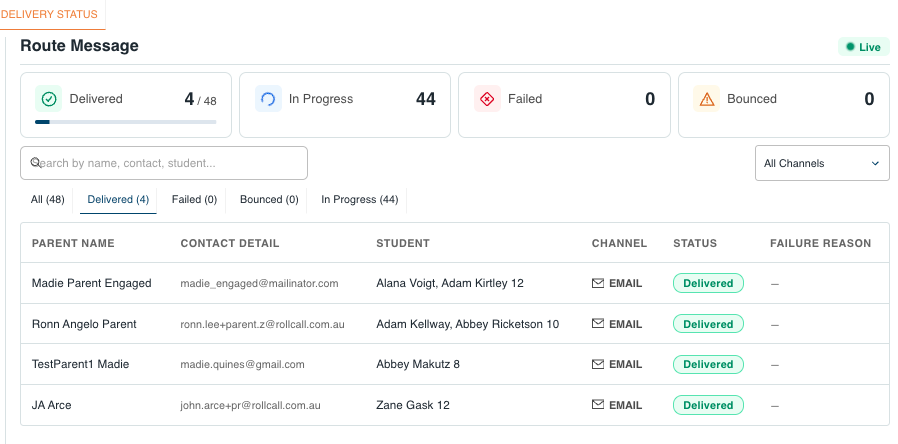
You can now view a live message delivery dashboard in the Admin Console. It shows each parent, which student they’re linked to, how the message was sent (SMS, email, etc.), and whether it’s been sent, delivered, or if there’s a problem.

It means more confidence when sending important or urgent messages - no more guessing if they've gone through.


Operational Dashboard - Enhancement

Transport coordinators can now open a route map directly from the Operational Dashboard by clicking the route name. This removes the extra step of opening the route details pop-up first, making it faster to check route information during daily operations. The existing menu access still works as before, and this applies to both morning and afternoon routes.


Parent App - Enhancement

When parents tap “Mark All as Read” in the app, it now works better.

Even if there are lots of unread messages, the app will mark them all as read more smoothly - so no missed messages.


Route Settings - Assign Students Enhancement

The Assign Students tab in Route Settings now shows more useful route booking information for administrators. The old Unassigned Students number has been removed because it could be misleading, and the Route Stops panel now displays Capacity, Unique Booked, and Peak Day (the busiest booked day) instead. This gives schools a clearer view of route demand before assigning students.

What's Fixed?

Student Sync Dashboard returns 502 Bad Gateway -  the dashboard now loads correctly so schools can review sync results and investigate sync issues as expected.


LMS Sync Errors Not Showing - Errors are now shown during the preview so schools can identify and correct issues sooner.


Reports / Parent Engagement Summary Report - Filter area showed two fields labelled "Group Filter". The report filters now display correctly, making it clearer for school staff to choose the right options when running the report.


Parent Relationships Duplicated - Student records should now show a single parent or guardian relationship for each unique email address, and duplicate entries should no longer reappear through normal syncing


Bus Stop Report Export Error "Exporting" - We resolved a problem that could make the report download link unavailable too quickly.  School admins should now be able to export and download the Bus Stop Report normally.


Bus Stop Report Export & Filtering Improvement - Excel export now matches the on-screen layout and can be used with Excel filters, sorting and table creation without manual clean-up.  School administrators can also filter the report by bus stop and view a travel time column, making it easier to analyse route performance and prepare planning reports.


Phone number Prefixes ( no longer default to AU)Phone numbers imported by CSV now use the school’s configured country code instead of defaulting to Australia.


Student Profile - Date of Birth Field - removed as unnecessary. 


? Need help??
Call us on 1300 821 116 or email support@rollcall.com.au

You are receiving this email as you signed up for our newsletters.

Want to change how you receive these emails?

You can Unsubscribe or Update your preferences


Was this article helpful?

That’s Great!

Thank you for your feedback

Sorry! We couldn't be helpful

Thank you for your feedback

Let us know how can we improve this article!

Select at least one of the reasons
CAPTCHA verification is required.

Feedback sent

We appreciate your effort and will try to fix the article