2026 RollCall Release Notes - 26 August

Modified on Fri, 4 Sep at 10:29 AM


Release Notes

Please find below our latest Release Notes, including new features and enhancements recently added to the RollCall system. These updates are designed to improve day-to-day transport management and support a smoother experience for schools, staff and families.


New Features & Enhancements

This release introduces several updates designed to make transport setup and daily management easier, including new year rollover tools, improved Parent App booking options, enhanced route planning controls and more reliable Driver App navigation. Read on for a closer look at the key features and improvements included in this release.


Year End [2026 to 2027] Rollover Review Tools

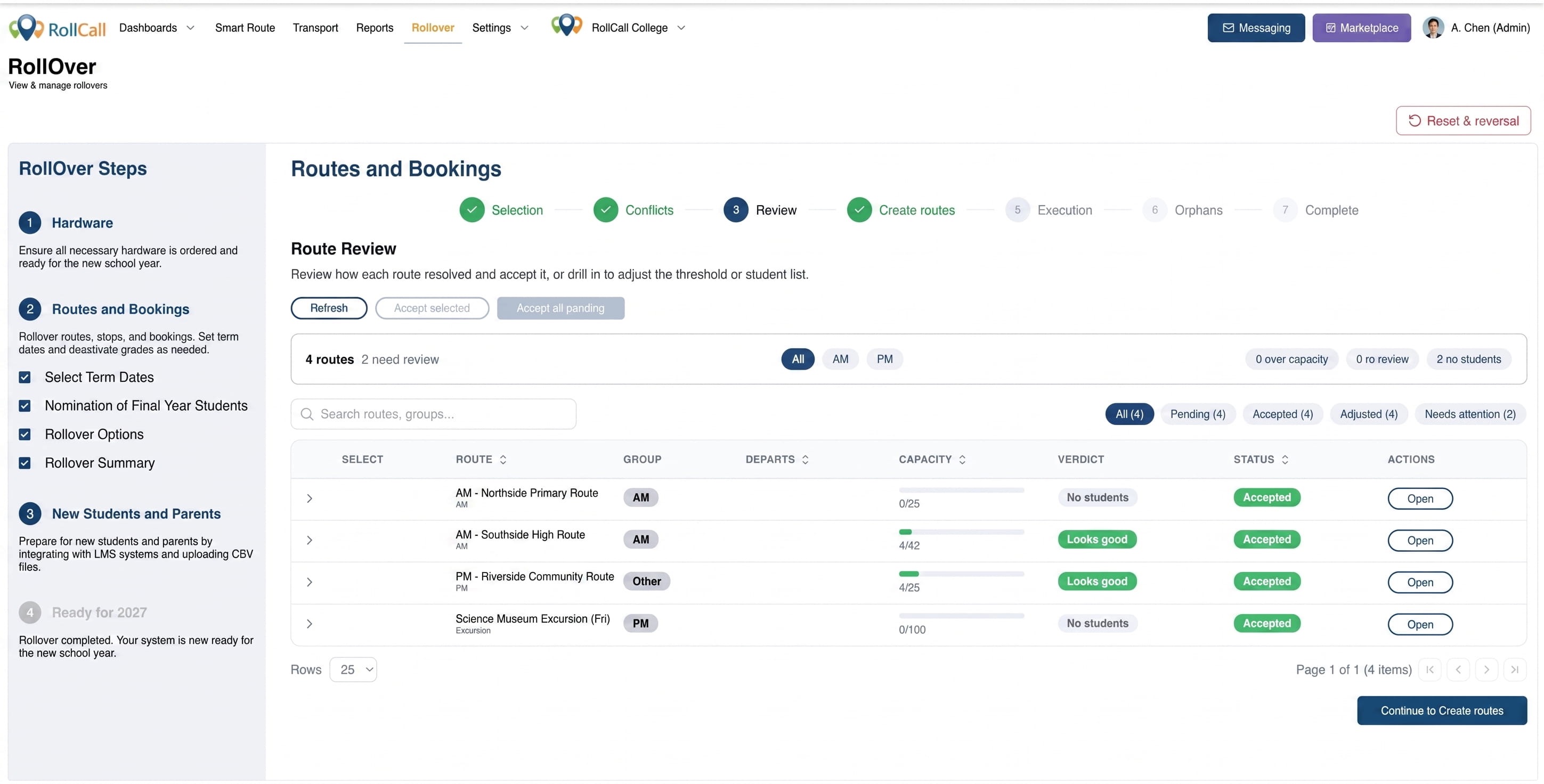
The year end rollover process now includes clearer route review, unallocated student worklists and reset options, helping schools review next year’s route setup, resolve missed students and restart the process safely if needed.

COMING SOON: Webinar and Training Sessions for Rollover  2026


Year End Rollover Processing Improvements

Year end rollover now handles students on multiple routes more safely, uses school-wide usage settings and shows live progress while bookings are processed in the background.


Route Builder Waypoints and Planned Navigation

[Controlled Release]

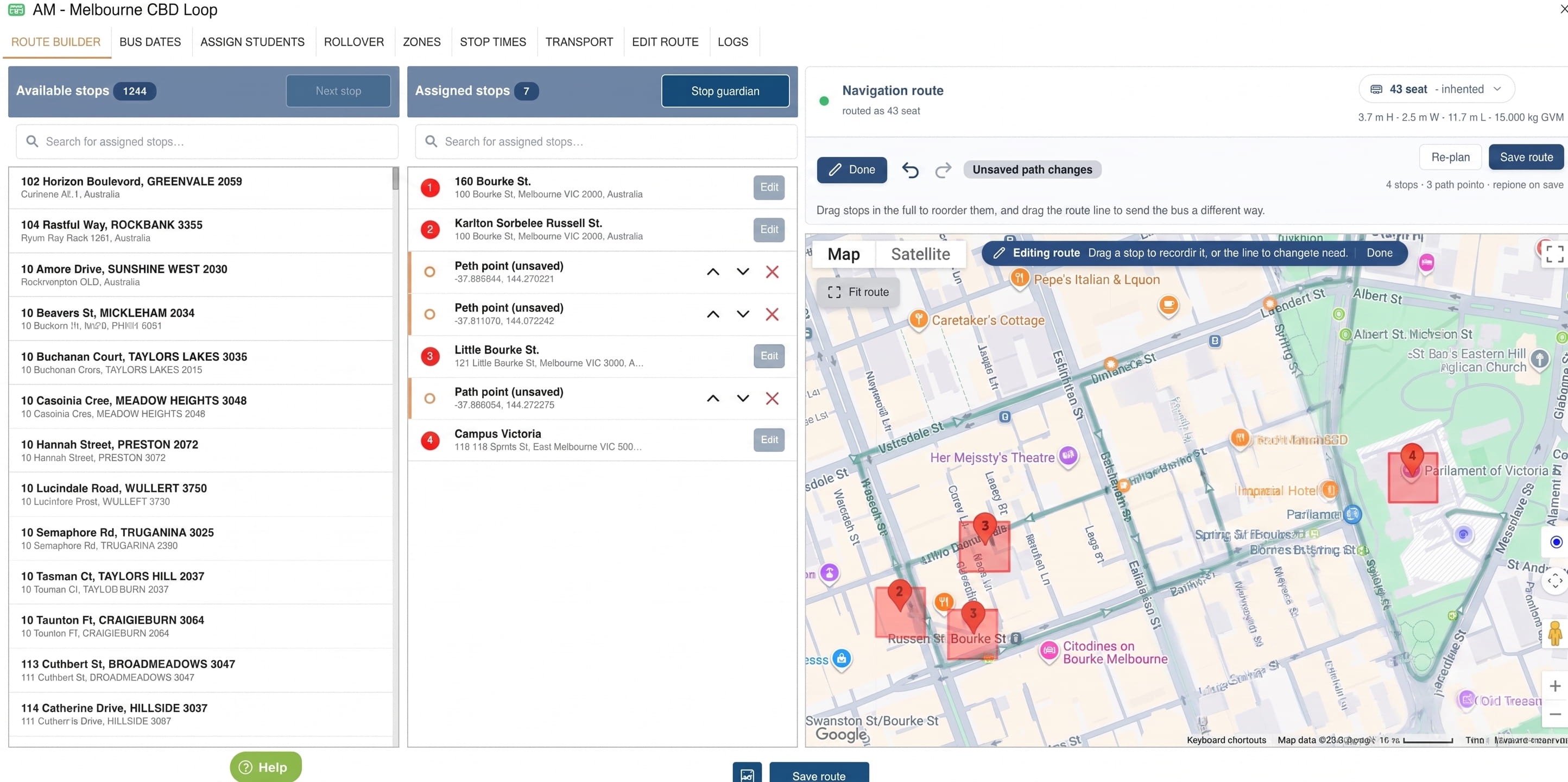
School administrators can now add navigation-only waypoints and fine-tune planned bus routes on the map, helping drivers follow school-approved roads without adding extra pickup or drop-off stops.


Driver App School-Planned Route Navigation

[Additional Monthly Charges Apply]

The Driver App can now follow the route path created by the school for turn-by-turn navigation, helping drivers stay aligned with the intended route between stops.


Driver App Navigation Labels

[Additional Monthly Charges Apply]

School administrators can now choose whether drivers see stop names or stop addresses during Driver App navigation, giving schools more control over the information shown to drivers.


Late Bus Booking Updates by CSV

School administrators can now upload a CSV to move selected students from their regular afternoon bus to a late bus across a chosen date range, reducing manual booking updates for after-school activities [International Schools].


More Flexible Student and Parent Imports

Student CSV imports now support grade values such as Pre-K, K, Prep and negative numbers, while parent CSV imports can bulk enable parent access during confirmation.


Added Carer Sign-In Access

Parents and carers added through the Parent App or Parent Web can now sign in straight away, reducing confusion for families and support teams.


New Parent Access and Welcome Email Prompt

School administrators can now enable parent access and send the welcome email in the same prompt after manually creating a parent, helping families get started sooner.


Smart Route - More Flexible Route Planning Schedules

School administrators can now choose a booking end date when scheduling routes from the route planning feature, giving schools more control over the full booking period.


Smart Route - Route Planning Map Refresh

The route planning workspace has been updated with clearer map controls, student and stop pop-ups, allocation statistics and improved zoom behaviour when selecting students.


Parent App Home Screen Shortcuts

Parents using the mobile app can now long-press the RollCall app icon to quickly create a bus absence or short-term bus change, making common booking updates faster to access.


Parent App Booking and Login Improvements

Parent App updates improve stop selection, booking changes, absence handling and Android sign-in reliability, making common parent workflows easier and more dependable.


Clearer Parent App Timetable and Booking Details

Parents now see clearer timetable wording, full bus and stop names, route filters, stop search, recent stops and map-area stop loading when reviewing or updating bookings.


What's fixed?


Parent App Access, Login and Session Fixes

Parent App sign-in, session renewal, shared email login and password-related issues have been fixed, improving access reliability for parents and carers.


Parent App Booking and Absence Fixes

Parent App booking, absence and route-change behaviour has been improved so bookings display more reliably, absences cannot be created after boarding, and school bus change rules are applied correctly.


Parent App Map and Stop Finder Fixes

Live map zoom, follow mode, map panel display, stop finder pins and long stop names now behave more reliably across Parent App map and booking screens.


Parent App Notifications and Holiday Information

Holiday information, notification loading and read-status behaviour now work correctly for affected parents and secondary carers.


Messaging and SMS Delivery Fixes

Route messages now avoid duplicate sends, show more accurate delivery results and send SMS messages more reliably, including when available message balances are low.


Admin Console Import and Parent Record Fixes

Parent imports, parent-student links, relationship tabs, duplicate parent email records and parent CSV update behaviour now work more consistently in the Admin Console.


Admin Console User and Settings Fixes

Password reset emails, deleted administrator re-creation, dropdown styling and Driver App setting tooltips have been corrected to reduce confusion for school administrators.


Driver App Route Completion and Handover Fixes

Driver App fixes improve GPS tracking, offline route completion, handover prompts and handover code visibility for students added during routes.


Transport Screen and Exception Reporting Fixes

Transport records now better reflect boarding scans, inactive student scans, No Stop Allocated exceptions and completed route activity.


Payment and Surcharge Fixes

Non-travel surcharges now apply more consistently, and bus change attempts linked to existing payments now show clearer messages instead of unexpected errors.


? Need help??

Call us on 1300 821 116 or email support@rollcall.com.au

You are receiving this email as you signed up for our newsletters.

Want to change how you receive these emails?

You can Unsubscribe or Update your preferences


Was this article helpful?

That’s Great!

Thank you for your feedback

Sorry! We couldn't be helpful

Thank you for your feedback

Let us know how can we improve this article!

Select at least one of the reasons
CAPTCHA verification is required.

Feedback sent

We appreciate your effort and will try to fix the article