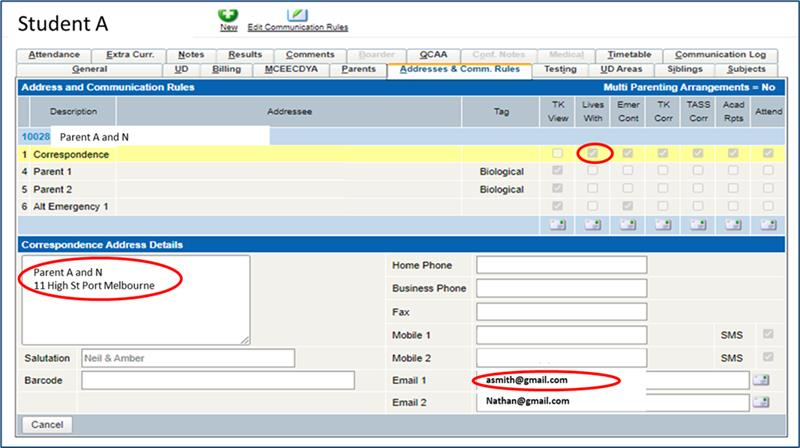
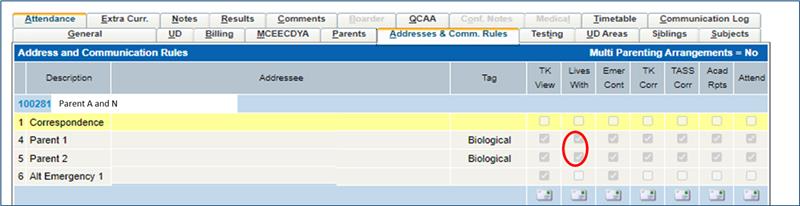
Example fields to check: (note your TASS version may differ)
Why is a parent marked as “Past Parent”?
A parent will be marked as Past Parent if they are no longer eligible under the TASS integration rules.
Common reasons include:
The student is no longer active
“Lives With” has been unticked
The relationship has been removed in TASS
The email address has been removed or changed
The parent no longer has any active students linked
When the API is active, RollCall reflects the current data in TASS.
If the relationship no longer exists in TASS, the parent will be marked as Past Parent at the next nightly sync.
Why is a parent missing from RollCall?
If a parent does not appear at all, check the following in TASS:
A valid Email 1 is entered
The Email 1 field contains only one email address
“Lives With” is ticked
The address number is 1, 4 or 5
The email address is unique
The relationship exists in the Communication Rules tab
The nightly sync has run
If any of these conditions are not met, the parent will not sync.
Why is a parent not syncing when the email looks correct?
RollCall expects one valid email address per Email 1 field.
If multiple email addresses are entered in the same field (for example separated by commas or semicolons), the parent record may fail validation and will not sync.
Each Email 1 field must contain:
One valid email address only
No additional addresses or delimiters
If multiple people require access, each must have their own parent record in TASS with their own unique email address.
Why is one parent syncing for a student, but another is not?
RollCall only synchronises parents who meet all eligibility rules.
If one parent appears and another does not, review in TASS:
“Lives With” is ticked for the correct address
The address number is 1, 4 or 5
A valid Email 1 is entered
The email address is unique
The relationship exists in the Communication Rules tab
If any of these differ between parents, only the eligible parent will sync.
Why are some Communication Rules applied and not others?
The integration does not read all address types or communication flags in TASS.
RollCall determines eligibility based on:
The “Lives With” flag
Supported address numbers (1, 4 and 5)
A valid Email 1 field
If a Communication Rule is applied to a different address number, or required fields are missing, the parent will not sync.
Review your Communication Rules configuration in TASS to ensure the correct address block is marked as “Lives With” and contains a valid email address.
Can we manually add primary parents in RollCall?
No.
When the API is active:
Primary parents must originate from TASS
Any primary parent added directly in RollCall will be marked as Past Parent at the next overnight sync
Secondary carers may be added via the RollCall Parent App.
A student has stopped syncing. What should we check?
First, confirm that the Student Number in RollCall has not been changed.
The Student Number is the unique identifier from TASS and must match exactly.
If the Student Number has been replaced (for example, with a Student Code value), restore it to the original value from TASS. Once corrected, the record will realign automatically at the next overnight sync.
If you are unsure of the correct Student Number, check the student record in TASS or contact support@rollcall.com.au for assistance.
What is the difference between Student Number and Student Code?
Student Number
The student’s unique identifier from TASS
Syncs automatically via the integration
Must not be changed in RollCall
Student Code (RollCall)
A separate RollCall field
Used for scanning or card purposes
Does not sync from TASS
Do not replace the Student Number with a Student Code value.
Can we choose which students are added to RollCall?
No.
The integration synchronises all students returned by TASS as active based on enrolment status and dates.
Individual students cannot be selectively excluded when using the API.
What happens when a student leaves the school?
When a student becomes inactive in TASS:
The student is made inactive in RollCall
Parent relationships update automatically
Parents with no remaining active students are marked as Past Parent
Are student card codes transferred from TASS?
No.
The Student Code field in RollCall does not sync from TASS and must be managed separately if required.
How do we request changes to our TASS integration settings?
If you would like to review or update your TASS integration settings, please contact:
Our team will advise on the impact of any requested changes before proceeding.
How do we request changes to our TASS integration settings?
Integration settings (such as parent sync rules or mode changes) can only be updated by RollCall.
If you would like to review or change your current integration settings, please contact:
Our team will review your request and advise on the impact of any changes before proceeding.
Was this article helpful?
That’s Great!
Thank you for your feedback
Sorry! We couldn't be helpful
Thank you for your feedback
Feedback sent
We appreciate your effort and will try to fix the article