Note: This article summarises the latest RollCall update. For screenshots and visual examples, please open the attached Release Notes PDF.
RollCall Release Update - Dec 2025 / Jan 2026
Over the coming week, these new features and improvements will begin rolling out across the RollCall platform. These updates are designed to provide a smoother, more secure experience for schools, parents, and drivers.
New Features & Enhancements
Improved Parent Account Setup & Login Experience
What’s New
Parent account setup and login has been redesigned to be simpler, more secure, and consistent across all schools using RollCall.
Parents now create one account using their email address, which works across all RollCall schools they are associated with.
This replaces the previous process that relied on school-issued welcome links and access tokens.
How Parents Get Started
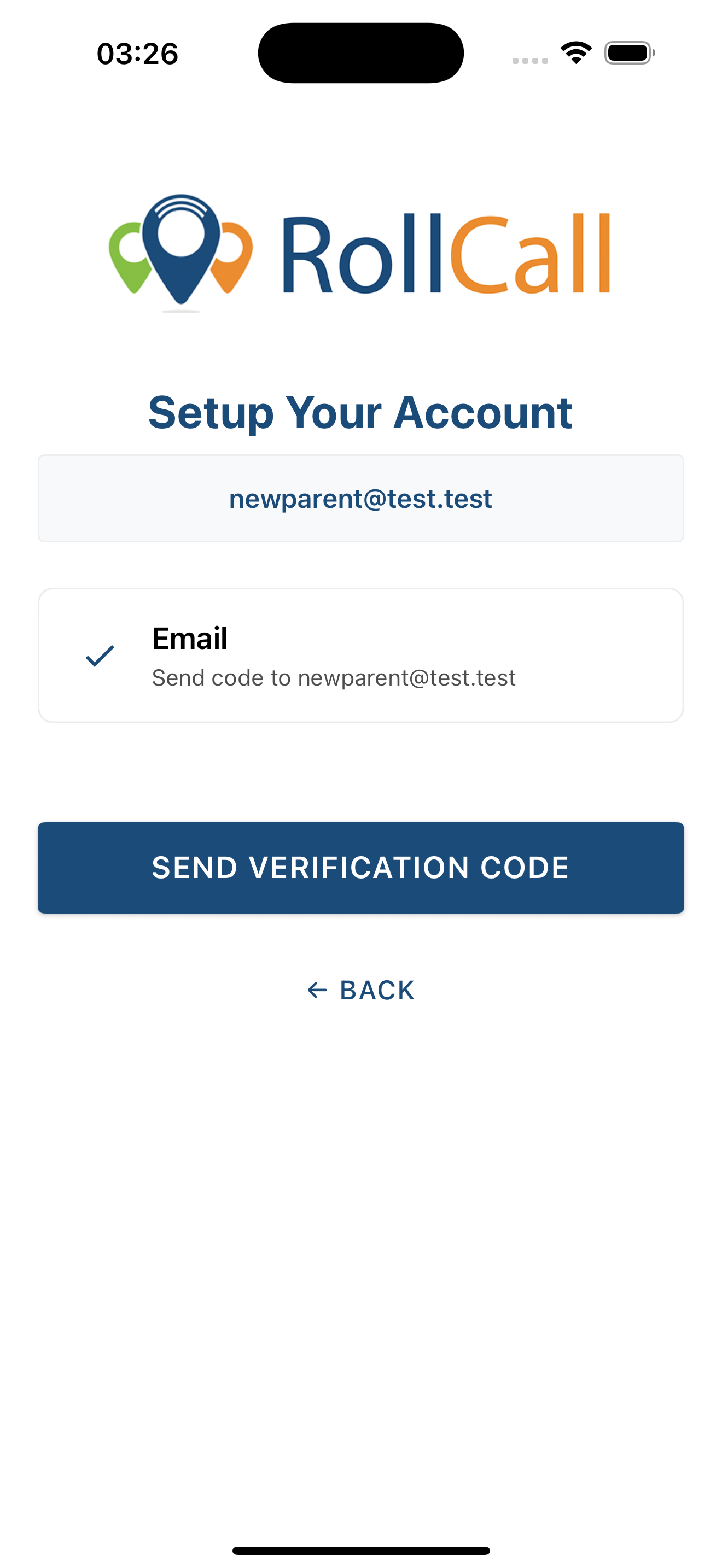
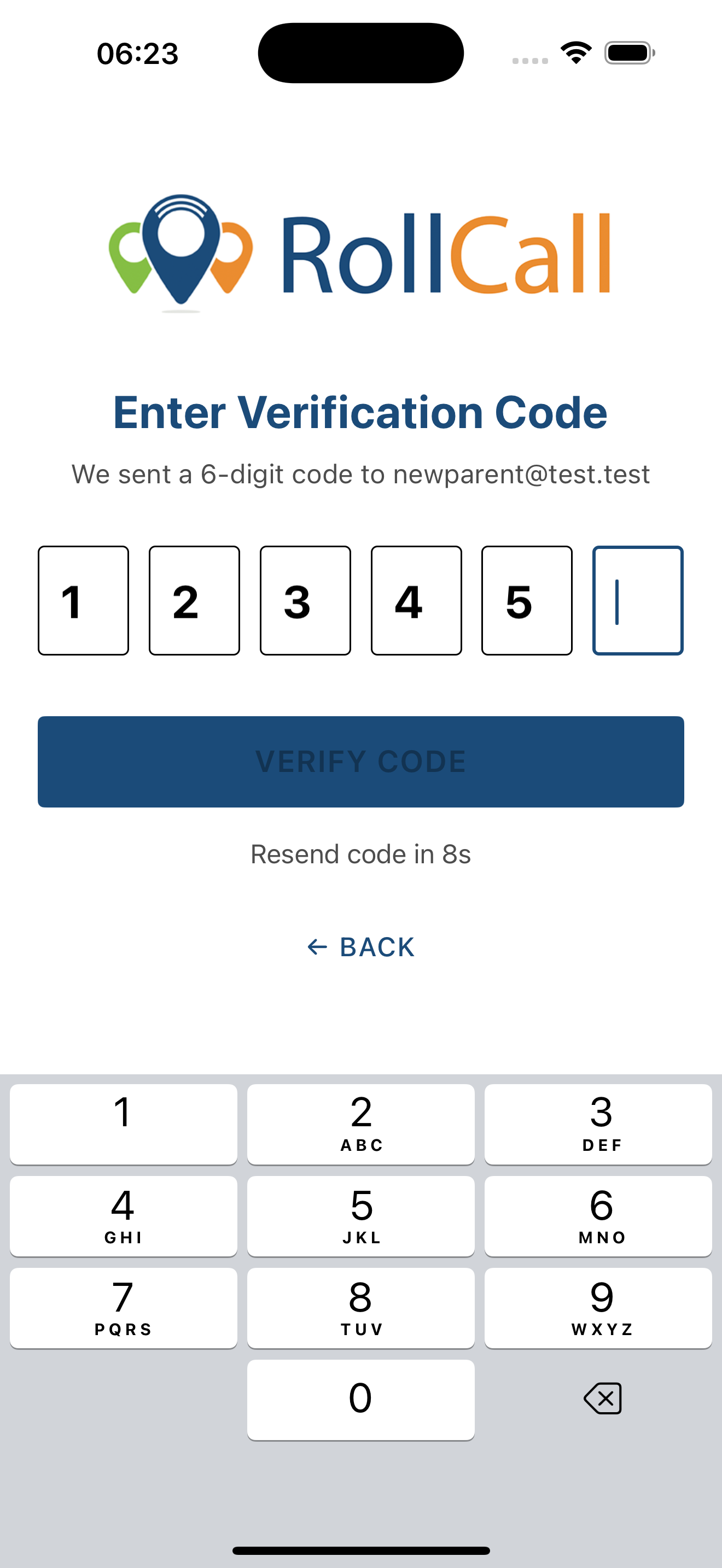
Parents can now set up their account directly in the Parent App (mobile or web).
Steps:
Enter their email address
Verify their identity using a secure one-time passcode (OTP)
Create a password
Once set up, the account works across all schools the parent is associated with, with no additional setup required.
Schools may still send a welcome email, but it is no longer required for parents to access the app.
Smarter Login Experience
The login screen now begins with email only.
Based on the schools linked to that email, the app automatically guides parents to the correct sign-in method.
This means:
Parents see the correct login option automatically
Parents with children at multiple schools can use one account
The app handles standard login vs SSO behind the scenes
What This Means for Parents
One account across all schools
Faster and clearer setup
Secure verification on first access
No waiting for login links or reset emails
What This Means for Schools
No need to issue or manage welcome tokens
No school codes required
Fewer password and access-related support requests
Reduced involvement in parent onboarding
Why This Matters
This update removes friction from parent onboarding while improving security.
Parents can access the app independently while schools spend less time managing account setup.
Simpler for parents. Less overhead for schools. Stronger security by default.

CSV Import Improvements (Students & Parents)
What’s New
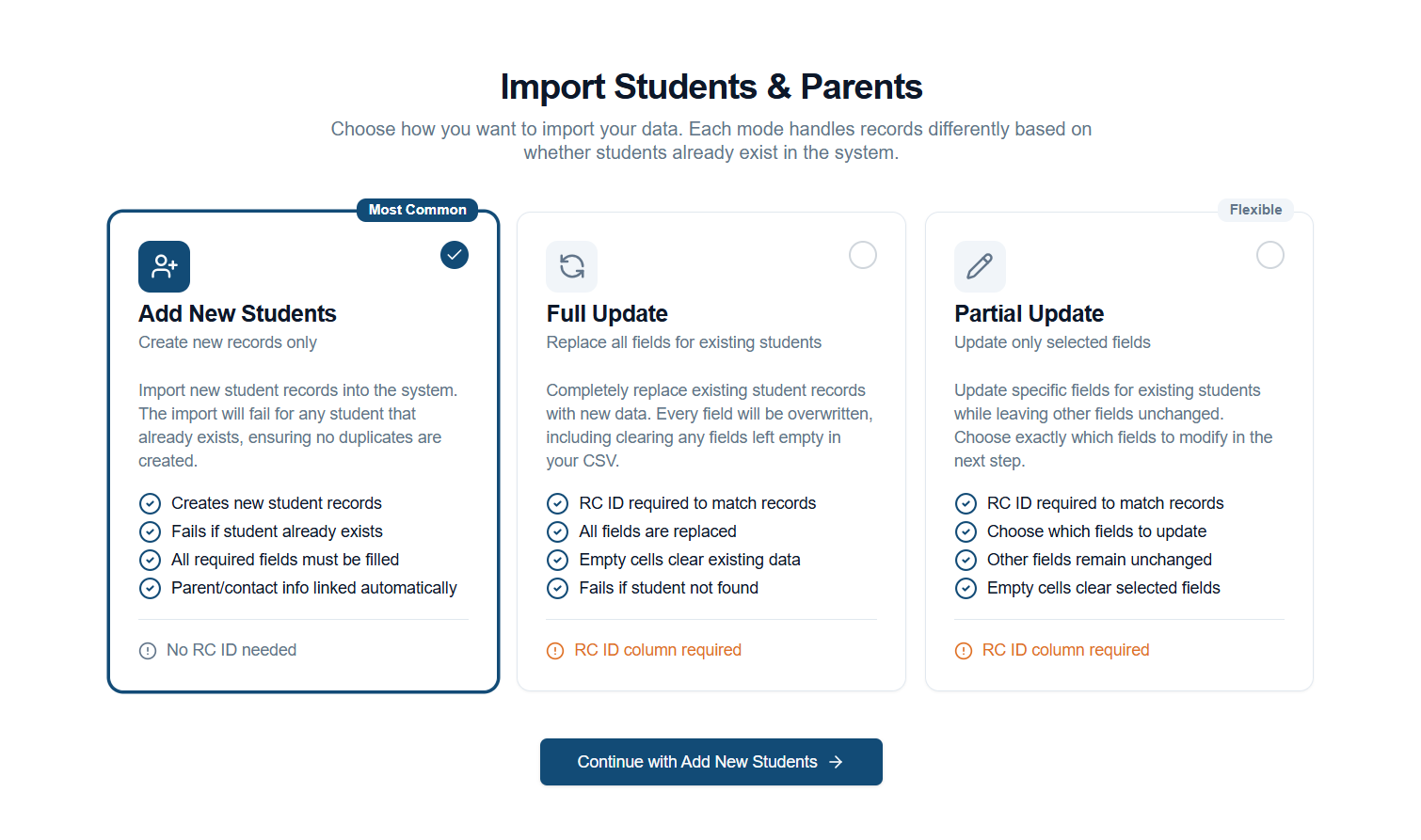
CSV imports for Students and Parents have been improved with a clearer, step-by-step upload process and more control over how data is applied.
Admins can now choose how their CSV affects existing records, making bulk updates safer and more predictable.
New Import Options
When uploading a CSV, administrators can select one of three import modes:
Add – Create New Students and Parents
Use this when adding brand new records.
Update – Replace Existing Records
Use this when you want to fully update existing students or parents.
Patch – Update Specific Fields Only
Use this when changing selected information without affecting the rest of the record.
Each mode clearly explains what will happen before the import runs.
What’s Improved
Guided upload flow with step-by-step instructions
Clear validation before import runs
Visibility of what records will be added or changed
More accurate import results and activity feedback
The new flow matches other familiar setup screens in the platform, making it easier to follow and harder to misconfigure.
Why This Matters
Bulk data updates are now clearer and safer.
Schools can confidently import data whether they are:
Adding new families
Updating existing records
Making targeted data changes
Parent App: Stop Arrival Times
What’s New
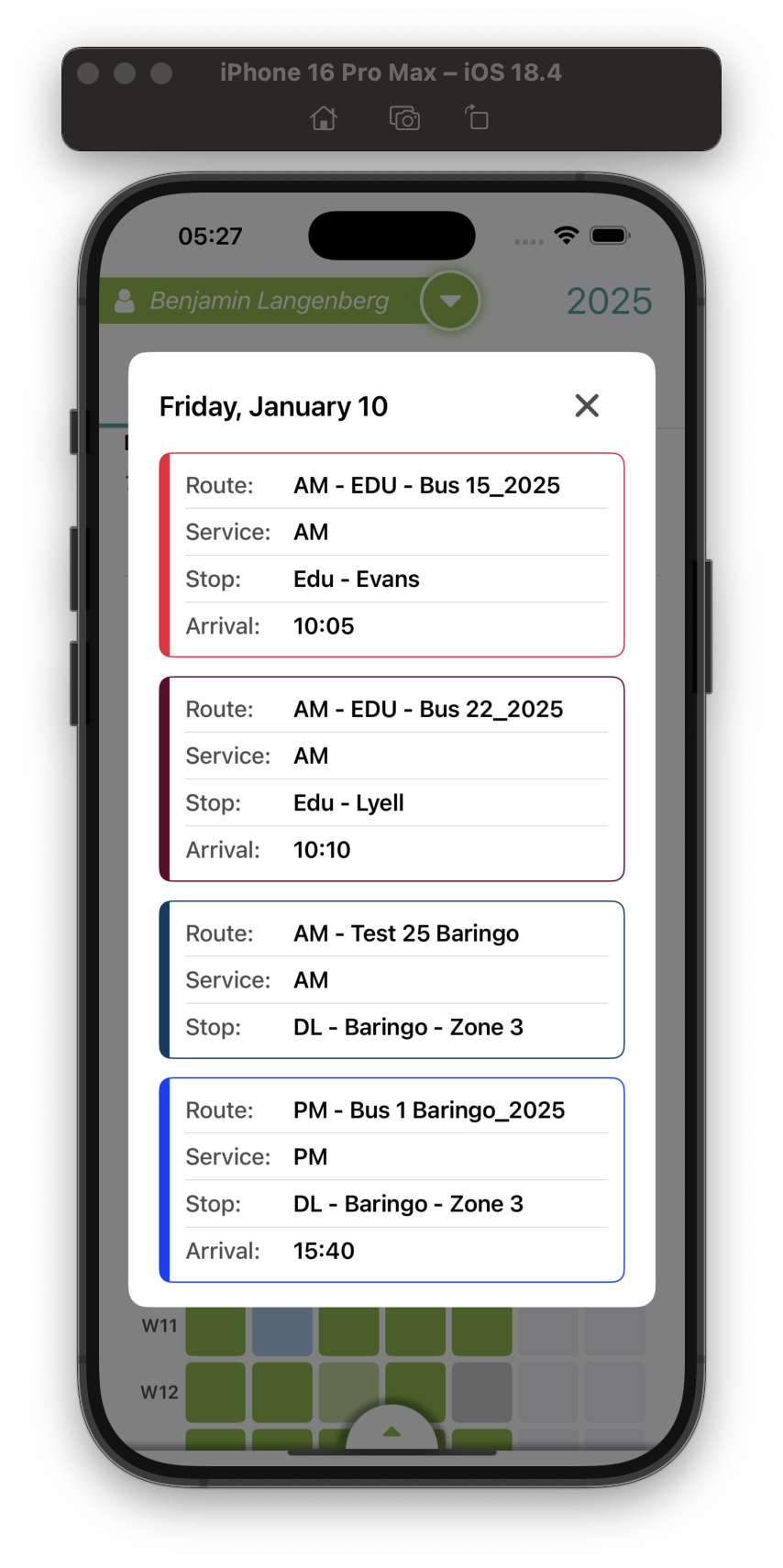
Parents can now view the scheduled arrival time for their child’s bus stop directly in the Parent App calendar.
Where It Appears
Parent App → Calendar → Scheduled Trip Details
How It Works
Stop arrival times are displayed exactly as configured during route planning, giving parents a clear and consistent expectation of when the bus will arrive.
Why This Matters
Parents can easily access stop timing information in the app, helping them plan daily routines without needing to request timetables from the school.
Driver App: Student Handover Codes (PAR / SIB / OWN)
What’s New
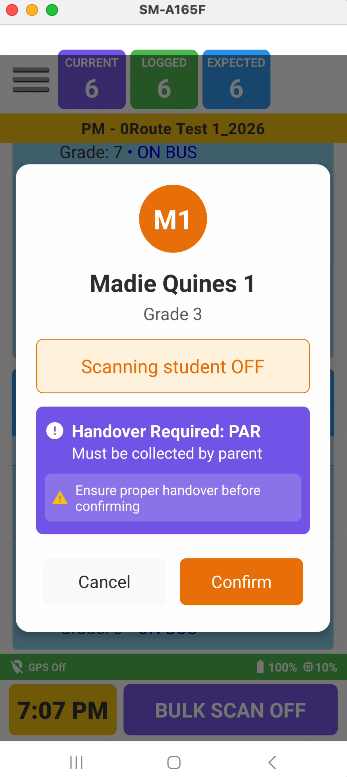
Schools can now apply Student Handover Codes for younger students. These codes appear clearly in the Driver App during drop-off.
This works alongside the school’s Underage Indicator, which defines which year levels require handover visibility.
How It Works
Schools set an Underage Indicator at a chosen year level.
This setting applies to all students in that year level and below.
For these students, schools can assign one handover code per student to indicate the approved release method.
Available Handover Codes
PAR – Parent Collection Required
Student must be handed to a parent or guardian at the stop.
SIB – Sibling Escort
Student travels on the bus with an older sibling.
OWN – Walks Home Independently
Student is approved to leave the bus independently.
Students above the Underage Indicator do not use handover codes.
What Drivers See
Clear visual handover indicators for underage students
Prominent guidance during scanning and drop-off
Existing wrong-stop alerts continue where configured
This ensures drivers have the right information at the right time, without clutter for older students.
Why This Matters
This feature provides age-appropriate handover control, increases driver confidence during drop-off, and adds an additional safety layer for younger students.


Driver App: Emergency Assistance Numbers
What’s New
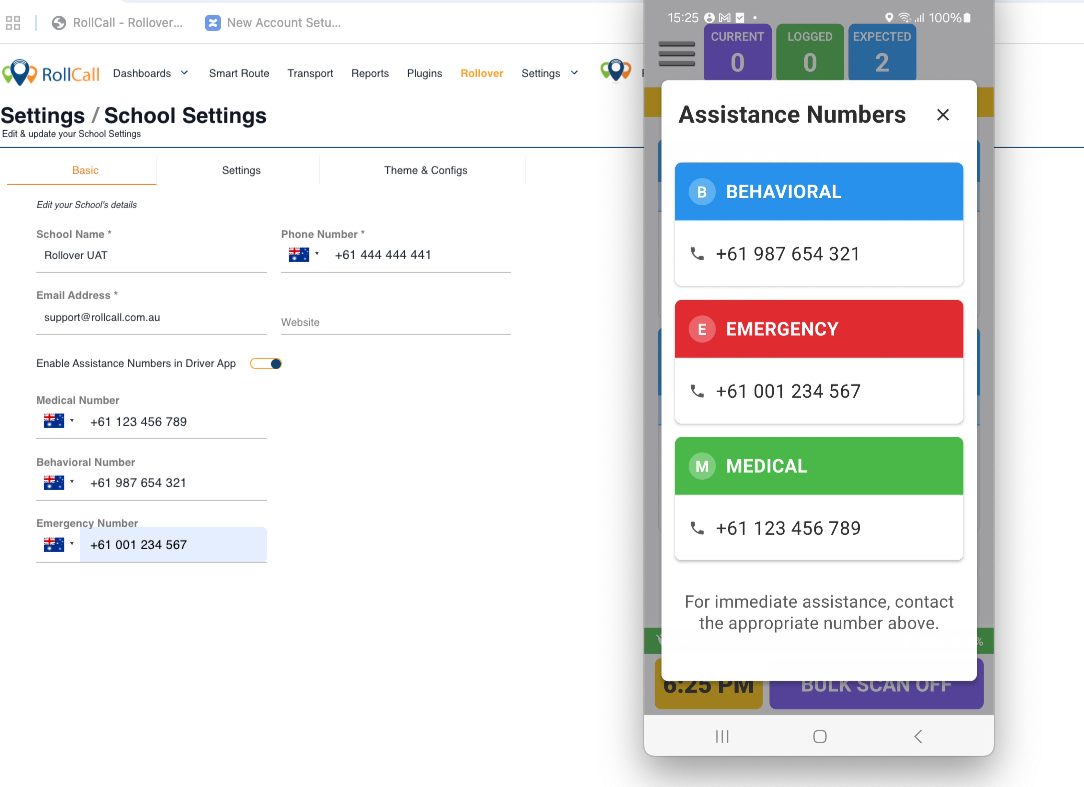
Drivers can now access important school contact numbers directly from the Driver App.
How It Works
Schools can configure Assistance Numbers for drivers and organise them by category.
Possible categories include:
Behavioural
Emergency
Medical
Only the categories and numbers configured by the school will appear.
Where Drivers Find It
Driver App → Main Menu → Assistance Numbers
The menu item appears only when:
Assistance numbers are enabled
At least one contact number has been configured
What Drivers See
Clearly labelled contact numbers grouped by category
Clean and easy-to-read layout
Access to numbers throughout the route, even without internet connection
Why This Matters
Drivers can quickly access the correct school contact when incidents occur, improving response time and reducing reliance on memory or paper lists.
What’s Fixed
Several reliability and consistency improvements have been made across the platform:
Parent App Login – New parents added via CSV import can now log in correctly.
CSV Imports – Importing sibling records no longer affects an existing parent’s engaged status.
Admin Console – Phone numbers now save and validate correctly.
Driver App – Completed routes now reliably mark as complete on the system.
Tips & Resources
Reports During Peak Hours
Report generation is paused during peak operational hours to maintain system performance.
Paused times:
7:00–9:00 AM and 3:00–6:00 PM AEDT
Reports are available again outside these hours.
? Need help?
Call 1300 821 116 or email support@rollcall.com.au
Was this article helpful?
That’s Great!
Thank you for your feedback
Sorry! We couldn't be helpful
Thank you for your feedback
Feedback sent
We appreciate your effort and will try to fix the article