Smart Route - Filters and Search on Biteable.
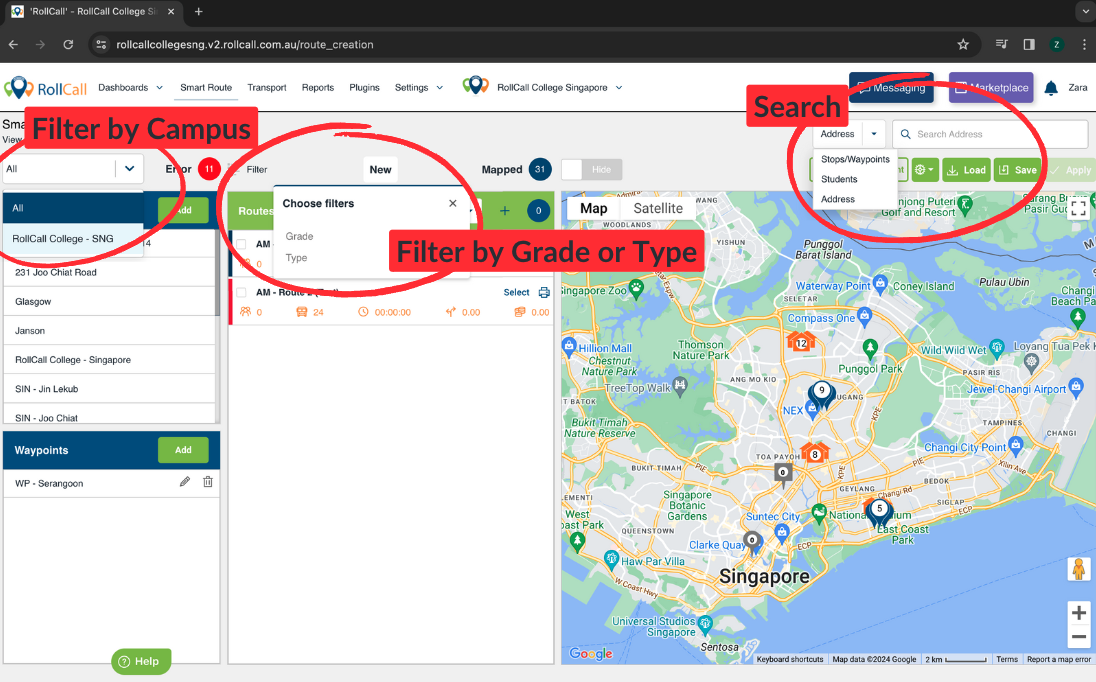
Filter by Campus
Filter Stops and Students visible on the map by the campus they are assigned to
Filter by Grade
Filter Students visible on the map by their Grade on the RollCall system
Filter by Student Type
Filter Stops and Students visible on the map by their assigned Type in the RollCall system
note. Contact the RollCall Support Team to setup Student Type in your RollCall system - this is a unique field and options are based on user preference
Search by Stops / Waypoints
Search for specific Stops or Waypoints to view their map location
Search by Student
Search for specific Students to view their map location
Search by Address
Search for a specific Address to view its map location
note. This is useful for checking a potential new Student's home location in comparison to the available Bus Routes and Stops in the area
Was this article helpful?
That’s Great!
Thank you for your feedback
Sorry! We couldn't be helpful
Thank you for your feedback
Feedback sent
We appreciate your effort and will try to fix the article