Overview
This guide walks you through setting up and configuring a Wonde integration in RollCall.
The Wonde integration allows RollCall to synchronise student and parent data directly from your school's Wonde environment.
Step 1 – Open the Wonde Integration
Navigate to:
Integrations → Student Sync → Wonde
Step 2 – Start the Integration Setup
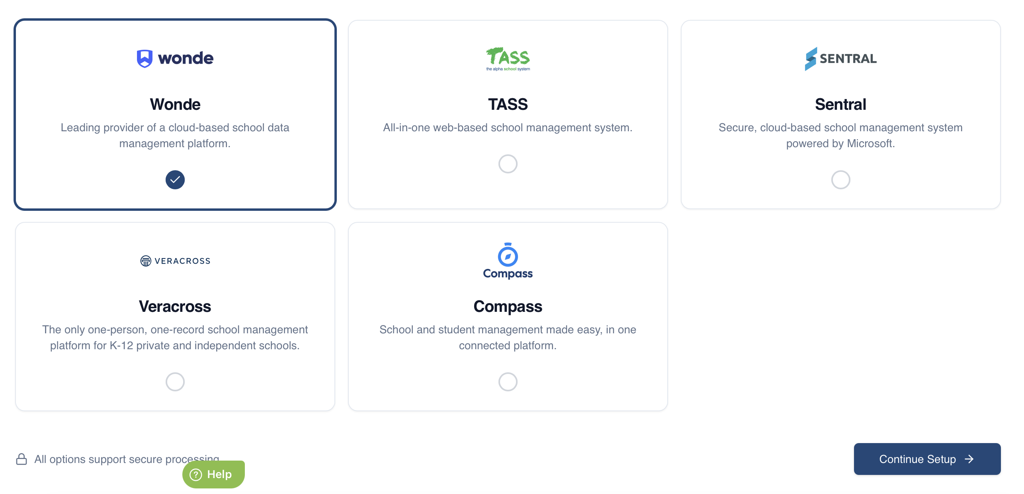
For New Integrations
If no Wonde integration currently exists:
Select Wonde
Click Continue Setup
You will be taken to the Wonde Settings screen.
For Existing Integrations
If a Wonde integration already exists:
Open the Wonde integration
Click Settings
You will be taken directly to the Wonde Settings screen.

Step 3 – Configure Basic Settings
Complete the following fields.
API Key
Enter your Wonde API Key.
This key is used by RollCall to authenticate and retrieve data from Wonde.
School ID
Enter your school's Wonde School ID.
Example:
A272144132
Region
Select the correct Wonde region.
The selected region determines which Wonde domain RollCall uses when retrieving data.
⚠️ Selecting the incorrect region will prevent RollCall from retrieving data successfully.
Enable Nightly Sync
Enable this option if you would like RollCall to automatically sync data each day.
When enabled:
Syncs run automatically at 2:00 PM UTC
When disabled:
Syncs must be run manually
Step 4 – Configure Parent Filters (Optional)
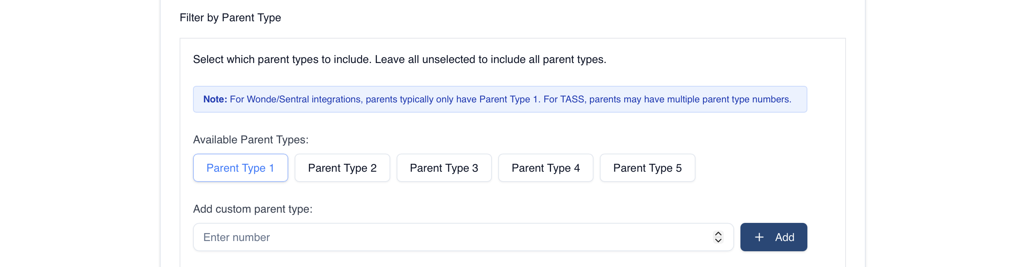
Parent Filters allow you to control which parents are synchronised into RollCall.
Filter by Parent Types
Parent Types are determined as follows:
Priority 1
Parents with:
parental_responsibility = true
Other Priorities
Parents without parental responsibility use:
priority
Priority Check Mode
Select how parent records should be processed.
Multi
Includes all parents matching the selected Parent Types.
Cascade
Checks Parent Types in order and only includes the configured number of parents.
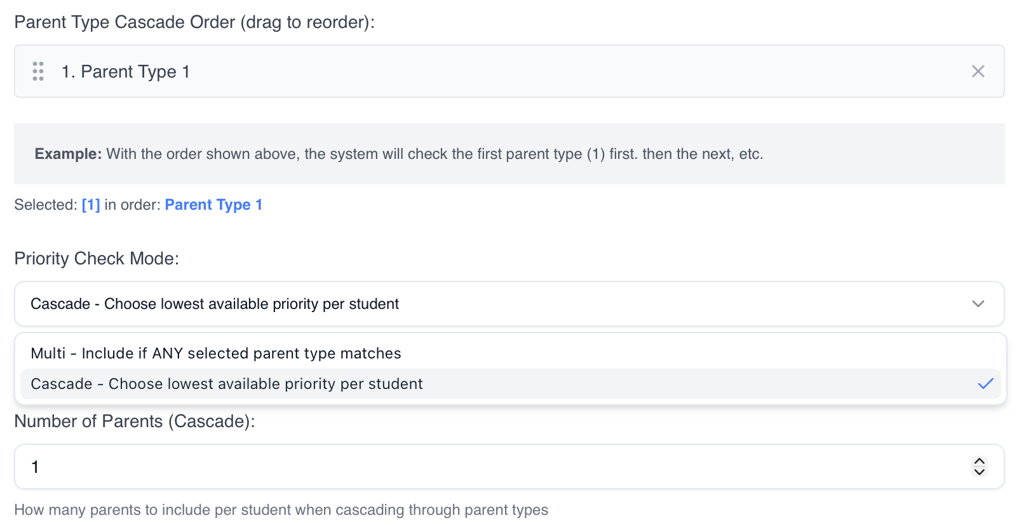
Parent Type Cascade Order
Available only when Cascade mode is selected.
This determines the order Parent Types are checked.
Example:
Parent Type 2
Parent Type 1
RollCall will check all Parent Type 2 records first before checking Parent Type 1.
Number of Parents
Available only when Cascade mode is selected.
This limits the maximum number of parents synced per student.
Example:
Value = 4
Maximum of 4 parents will be synced for that student
Only Include Parents Who Live With Student
Enable this option to sync only parents who live with the student.
Wonde identifies these parents using:
lives_with_pupil = true

Only Include Correspondence Contacts
Enable this option to sync only correspondence contacts.
Wonde identifies these parents using:
correspondence = true
Important
All Parent Filters use AND logic.
Parents must meet all enabled filter conditions to be included in the sync.
Step 5 – Configure Additional Settings

Include Future Students
Enable this option to include pre-admission students.
When enabled:
RollCall makes an additional request to Wonde
Students starting within the next 3 months are included
⚠️ Your API Key must have sufficient permissions for this feature.
Use Secondary IDs
Enable this option if your school uses Wonde Secondary IDs.
When Enabled
RollCall uses:
mis_secondary_id
as the LMS identifier.
When Disabled (Default)
RollCall uses:
mis_id
as the LMS identifier.
Step 6 – Configure Excluded Fields (Optional)
Exclude Campus
If Campus is excluded:
During Student Creation
Campus will be set to blank (null)
During Student Updates
Existing Campus values will remain unchanged
RollCall will ignore Campus updates from Wonde
Step 7 – Save Your Configuration
After completing all required fields:
Review your settings
Click Save
Your Wonde integration is now configured.
Next Steps
After saving the integration:
Navigate to the Preview tab
Generate a Preview
Review any student, parent, or relationship changes
Run a Manual Sync when ready
Best Practice Recommendations
✅ Verify your API Key before saving
✅ Confirm the correct School ID and Region have been selected
✅ Review Parent Filters carefully before your first sync
✅ Generate a Preview before running a Manual Sync
✅ Enable Nightly Sync if you want automatic updates
✅ Only enable Secondary IDs if required by your Wonde configuration
Troubleshooting
| Issue | Possible Cause |
|---|---|
| Sync fails immediately | Invalid API Key |
| No students retrieved | Incorrect School ID |
| Data retrieval errors | Incorrect Region selected |
| Missing parents | Parent Filters excluding records |
| Future students not appearing | Future Students setting disabled or insufficient permissions |
Once configured successfully, RollCall will be able to synchronise student and parent information directly from Wonde.
Was this article helpful?
That’s Great!
Thank you for your feedback
Sorry! We couldn't be helpful
Thank you for your feedback
Feedback sent
We appreciate your effort and will try to fix the article